

 15 minutes read
You're probably looking at a firm that's already past the point where spreadsheets and shared inboxes can keep up. Intake is slipping, deadlines live in too many places, and somebody always ends up retyping the same client details into another form. That's exactly why legal case management software small firms rely on has become a core operating decision, not a nice-to-have. The right platform gives you one system for matters, documents, dates, billing, and client communication, while the wrong one just moves the chaos into a prettier interface.
For solo and small firms, the key question isn't whether to adopt software. It's which platform fits your bottleneck, your staff's tolerance for complexity, and the way your work flows. Cloud-based tools are now baseline expectations in the small-firm market, not a differentiator, and adoption has moved sharply among the smallest practices, with solo practitioners rising from 32% in 2021 to 45% in 2022 and firms with 10 to 49 attorneys rising from 22% to 40% over the same period, according to an ABA-based summary PracticePanther's small-firm software guide. For lean teams, that means the shortlist should be built around four lenses, cost, ease of use, features, and practice fit.
| Platform | Starting Price per User/Month | Ease of Use | Standout Feature | Best Fit For |
|---|---|---|---|---|
| Clio | About $59 | Low-to-medium technical requirement | Broad practice management ecosystem | Solo to small firms needing a familiar all-around option |
| MyCase | Not specified in verified data | Value-led, straightforward | Practice management for firms moving off spreadsheets or paper | SMBs that want practical core workflows |
| PracticePanther | About $59 | Usually low-friction | Legal CRM, intake, and document management | Small firms focused on intake and client handling |
| Smokeball | About $49 | Quick-setup oriented | Document automation and Outlook integration | Document-heavy small and mid-sized firms |
| CASEpeer | About $79 | More specialized | AI-assisted reporting and client-experience tools | Personal-injury firms |
| Filevine | About $87 | More advanced | Deeper matter handling | Firms with heavier case complexity |
| CosmoLex | About $119 | More specialized | Native legal accounting and trust accounting | Firms that need accounting built in |
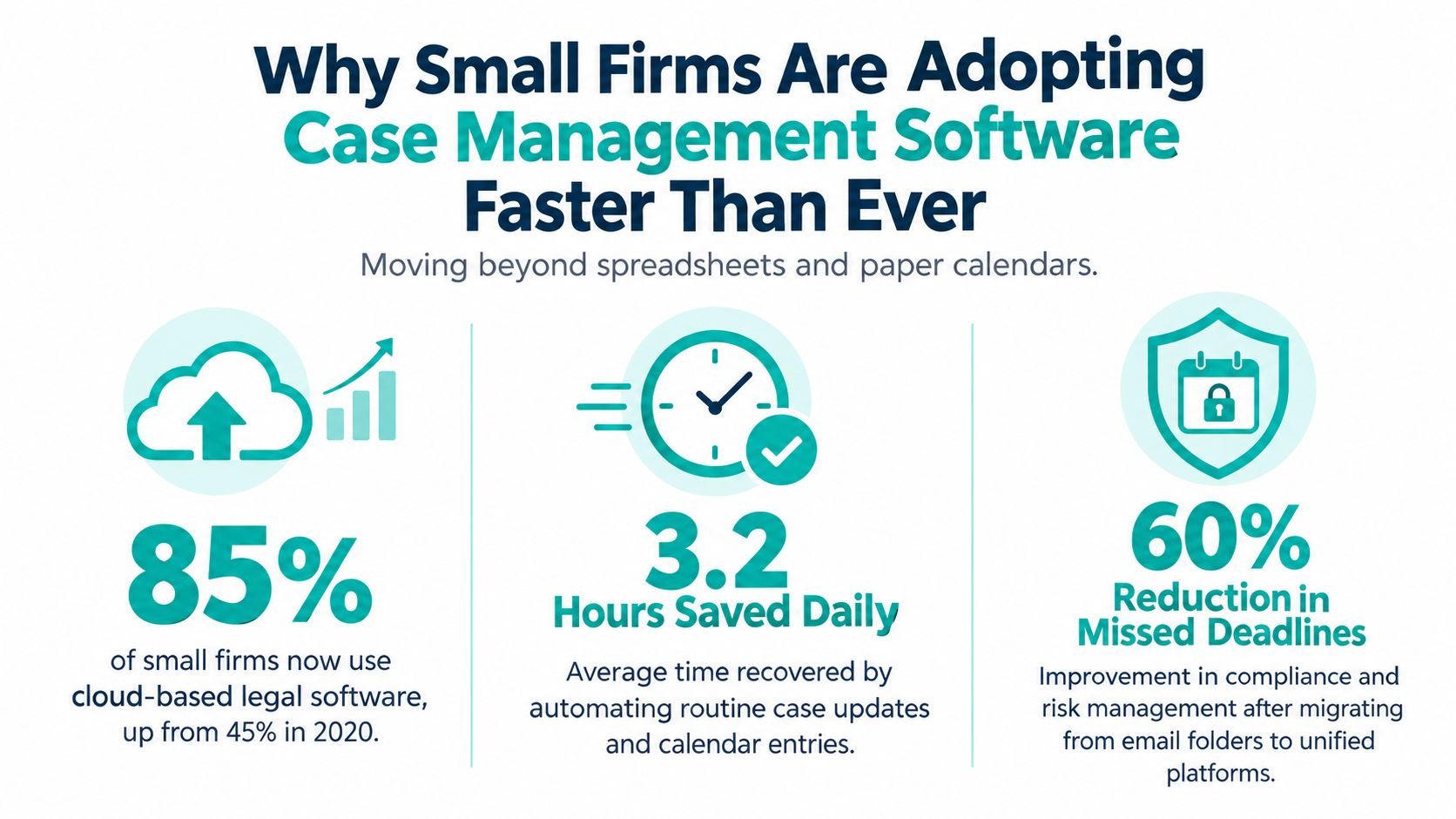
Small firms are adopting case management software because the old operating model breaks first at the edges. A solo or five-lawyer practice can't afford to lose time hunting through email threads, paper calendars, and disconnected document folders. When every client call, deadline, and invoice lives in a separate place, staff ends up doing unpaid admin instead of legal work.
The shift isn't just about convenience. Cloud tools make it possible to keep intake, matter updates, documents, and billing in one place across a distributed team, which matters when your legal assistant is remote, your paralegal works hybrid, and your provider is moving between court, home, and office. An American Bar Association news release reported that 73% of firms use cloud-based legal tools, and a separate legal-technology summary citing the 2024 Clio Legal Trends Report says only 3% of solo firms and 4% of small firms are not using cloud-based practice management software, implying adoption rates of 97% and 96% in those segments TheLawGPT's legal case management summary.

Practical rule: if your current process depends on one person remembering where everything lives, you don't have a process, you have a memory test.
The key shift is that software familiarity is no longer limited to large firms with dedicated IT support. Small firms now expect remote collaboration, real-time matter updates, and cloud access as part of normal operations, not as a premium add-on. That expectation matters if you use contract paralegals, remote legal assistants, or bilingual staff who need to work inside the same matter record.
It also changes how you shortlist vendors. Don't start with brand familiarity. Start with the workflow that hurts most, then ask whether the system really fixes it. A polished demo can hide weak intake routing, clumsy calendaring, or a document system that still needs rework after the sale.
For practices that rely heavily on first-contact conversion, the intake layer deserves special attention. If you're comparing intake workflows, a focused legal intake services workflow can tell you how much of the front office burden you're trying to automate versus staff manually.
If a platform can't handle the fundamentals, the rest of the pitch doesn't matter. Small firms should expect matter and contact management, document automation, calendaring, time tracking, billing, trust accounting, client portals, e-signature integration, and conflict checks. Anything less is a compromise, not a solution.
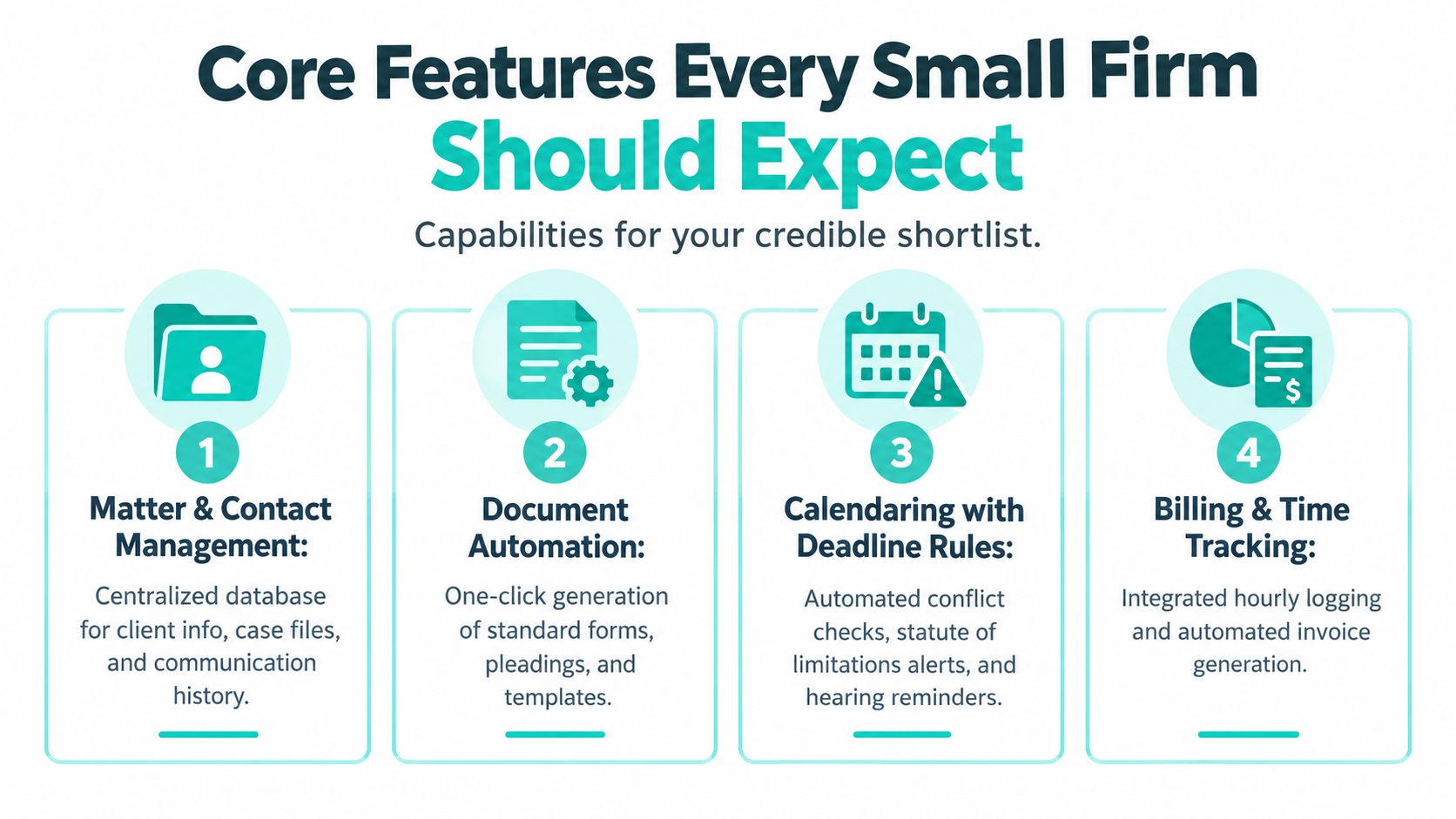
Matter and contact management are the spine of the system. Every client, file, note, and communication should sit inside one matter record, so a new assistant or case manager can get up to speed fast. If the platform can't show the current status of a file without opening multiple tabs, it's already costing you time.
Document automation is the other table-stakes feature. A real system should do more than fill in static templates, it should handle conditional logic so the firm can generate forms, letters, or pleadings with less rework. That matters in firms where routine intake packets, demand letters, or engagement documents eat up attorney and staff time.
Calendaring has to do more than show appointments. It should support deadline rules, conflict checks, and reminders tied to the matter, because one missed date can wipe out weeks of work. Time tracking and billing should connect directly to the case record so attorneys don't spend evenings reconstructing work from memory.
Trust accounting deserves its own test. If your state bar requires IOLTA handling, the platform should either support it natively or do it cleanly through the accounting stack you already use. Don't assume a billing module is enough. Ask whether trust balances, deposits, and reconciliations are built for legal practice, or whether you'll still need extra spreadsheets and workarounds.
A system earns its keep when staff stop asking, “Where is that file?” and start asking, “What's the next task on this matter?”
A secure client portal is worth more than most marketing copy suggests. It gives you one place to share documents, request signatures, and keep communication attached to the matter. Pair that with e-signature, and you reduce the number of disconnected tools your team has to manage.
Conflict checks are essential. A shortcut here creates exposure that no amount of convenience can offset. If a platform buries conflicts behind too many steps, that's a warning sign, not a minor annoyance.
The best comparison isn't feature count, it's how each system handles your hardest workflow. Clio, MyCase, PracticePanther, Smokeball, Filevine, CASEpeer, and CosmoLex sit at different points on the price-feature curve, and the right one depends on whether you care most about setup simplicity, document automation, billing, or accounting depth SoftwareFinder's market comparison.
| Platform | Starting Price (per user/month) | Ease of Use | Standout Feature | Best Fit For |
|---|---|---|---|---|
| Clio | About $59 | Low-to-medium technical requirement | Broad ecosystem and flexible fit | Small firms that want a familiar all-round platform |
| MyCase | Not specified in verified data | Straightforward | Value-led practice management | Firms moving off spreadsheets or paper processes |
| PracticePanther | About $59 | Generally easy to adopt | Legal CRM and intake support | Intake-heavy small firms |
| Smokeball | About $49 | Quick-setup oriented | Strong document automation and Outlook integration | Firms with document churn and calendar load |
| Filevine | About $87 | More advanced | Deeper matter handling | Heavier litigation and file complexity |
| CASEpeer | About $79 | Specialized | AI-assisted reporting and client-experience tools | Personal-injury practices |
| CosmoLex | About $119 | More specialized | Native legal accounting and trust accounting | Firms that want accounting built in |
Smokeball is the budget-conscious choice when document automation is the pain point, especially if your team lives in Outlook. PracticePanther is stronger when intake, CRM, and document handling matter more than accounting depth. CosmoLex sits at the higher end because trust accounting is built in, which is a real advantage for firms that want fewer add-ons.
Clio is often the safe shortlist option because it covers a lot of ground without forcing a highly technical setup. Filevine tends to make more sense when the matter itself is more complex, while CASEpeer is more specialized for plaintiff work. MyCase is usually the pragmatic option for firms that want cleaner operations without adopting a heavyweight system.
If you need the platform to act like an accounting system, choose accounting depth first. If you need it to act like a filing-and-workflow engine, choose automation and matter organization first.
The hidden trade-off is that a broader ecosystem can support scale, while a lighter platform can cut admin time. That's why some firms value a lower learning curve more than an all-in-one label. A polished demo doesn't tell you whether your staff will use the features on day two.
Most firms don't need every feature on the market. They need the one feature that removes the bottleneck already slowing revenue, deadlines, or staff capacity. That's why the right choice for one practice area can be wrong for another.
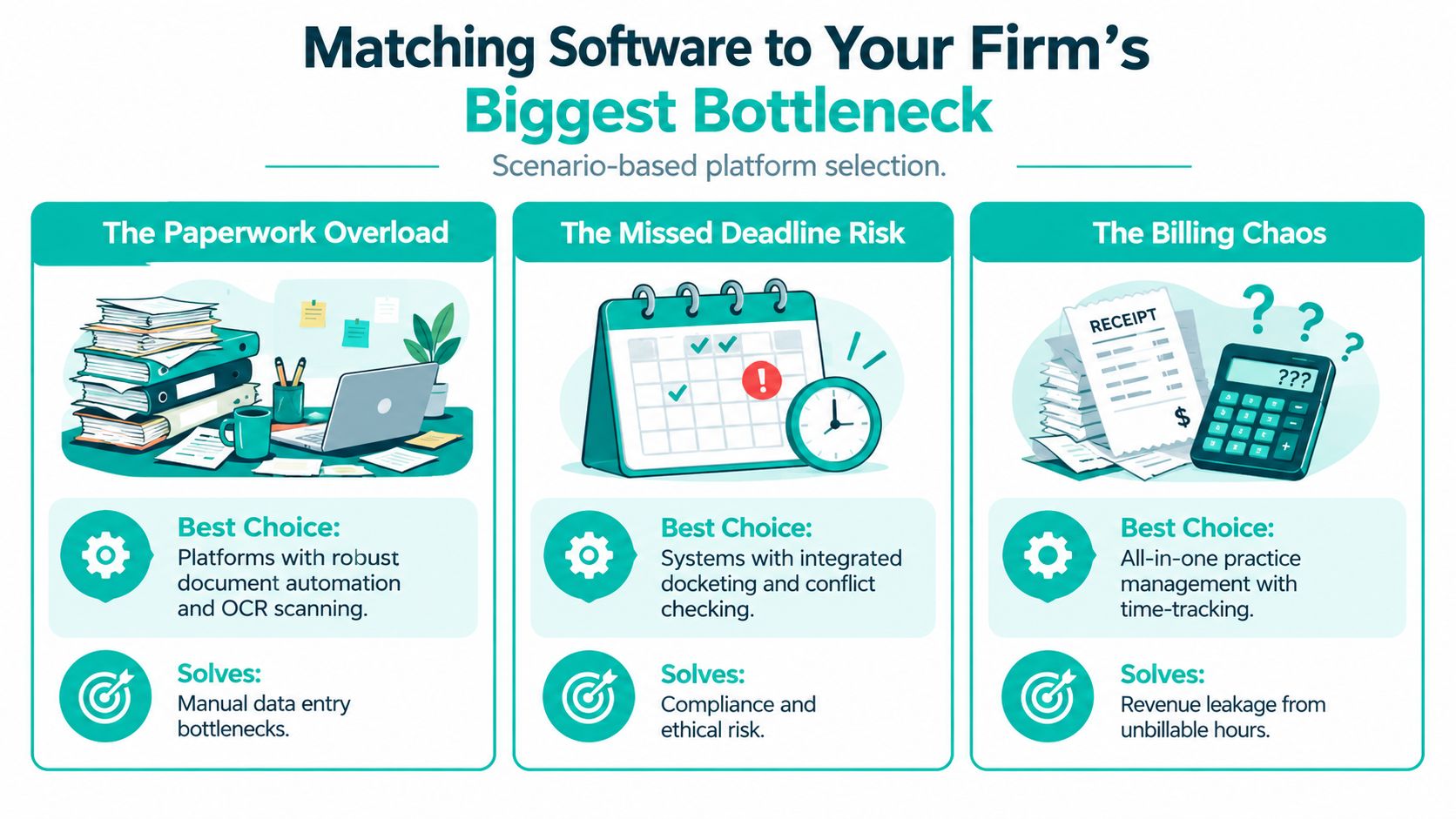
A two-attorney family law firm drowning in intake calls should care less about broad feature lists and more about lead-to-matter conversion. Clio Grow, MyCase intake flows, and Lawmatics all deserve a look here, but the deciding factor is speed from first contact to booked consultation. If the system makes staff retype intake data or slows conflict checks, it's not solving the problem.
That's where an intake specialist or virtual receptionist can matter as much as the software. A platform only works if someone is moving leads into it correctly. If your front desk is stretched thin, it may make more sense to pair the system with remote support such as case manager hiring support than to assume the software alone will fix the funnel.
A solo personal injury firm buried in demand letters and medical records needs document automation and file handling that save time immediately. PracticePanther is attractive for firms that want stronger document and intake workflows, while Smokeball stands out where structured automation and Outlook integration help reduce repetitive work. If your team spends half its week assembling the same packet, that's where the software should be judged.
A four-attorney estate planning practice facing trust reconciliation headaches has a different priority. CosmoLex's native legal accounting is the more obvious fit when trust handling is the pain point, while Clio can work if you're comfortable pairing it with add-ons and integrations. The question isn't which product has more features. It's which one removes the most manual accounting work without creating new cleanup steps.
What's the one task eating the most billable hours this quarter? If the answer is intake, choose for intake. If it's documents, choose for automation. If it's trust accounting, choose for accounting depth. That single answer usually tells you more than a vendor pitch deck does.
Sticker price is not total cost. Small firms often budget for the monthly subscription and underestimate the rest, which is why a cheap-looking platform can feel expensive by the time the rollout ends. The total bill includes migration, training, support, integrations, and lost billable time during adoption.
| Platform | Published Per-User Price | Migration Cost | Paid Add-Ons | Estimated First-Year Total |
|---|---|---|---|---|
| Clio | About $59 | Often quoted after scoping | Trust add-ons, integrations, support tiers | Higher than subscription alone |
| MyCase | Not specified in verified data | Often quoted after scoping | Integrations, support tiers | Higher than subscription alone |
| PracticePanther | About $59 | Often quoted after scoping | CRM-related extras, support tiers | Higher than subscription alone |
| Smokeball | About $49 | Often quoted after scoping | Document and integration-related add-ons | Higher than subscription alone |
| CASEpeer | About $79 | Often quoted after scoping | Specialized reporting or support tiers | Higher than subscription alone |
Vendors may quote data migration after the demo, not before it. Training can also become a real cost when the vendor only covers the basics and your team still needs internal time to clean data, rewrite templates, and re-map permissions. If your firm runs a lot of billing or trust work, setup can also expose weak spots in your existing process.
You should also budget for the hidden friction of switching. Staff turnover in the first year means retraining, which can be more expensive than people expect because the knowledge walks out the door with the leaver. That's why the first-year cost usually feels heavier than the subscription suggests.
Rule of thumb: for firms under ten users, real first-year cost often lands far above the advertised seat price once onboarding and implementation are included.
That's where the price-feature gradient matters. A platform with a lower monthly fee can still cost more if it needs extra configuration, while a pricier tool can be the better deal if it removes manual work you're already paying staff to do. If you're comparing vendors, anchor the conversation in total workflow cost, not just list price. For deeper budget planning, this pricing overview for legal staffing and support can help you separate software spend from staffing spend.
The right platform changes with the practice. A solo general practice doesn't need the same stack as a personal injury shop with heavy records volume, and a small family law firm doesn't need the same setup as an immigration practice with multilingual intake demands.
| Practice Area | Solo 1 Attorney | Small Team 2 to 5 Attorneys | Growing Firm 6 to 10 Attorneys |
|---|---|---|---|
| Solo General Practice | MyCase or PracticePanther | MyCase or PracticePanther | Clio or PracticePanther |
| Personal Injury | Smokeball | Filevine | Filevine |
| Family Law | Clio | Clio plus intake support | Clio with stronger intake workflows |
| Immigration | PracticePanther | PracticePanther | CASEpeer or PracticePanther depending on structure |
| Civil Litigation | Smokeball | Clio Manage | Clio Manage or Smokeball |
For solo general practice, MyCase and PracticePanther are the most sensible starting points because they avoid overbuilding the stack. A solo lawyer needs speed, transparency, and enough structure to keep the day moving. If the platform makes billing or intake clunky, it's too much system for too little return.
Once that solo practice grows into a 2 to 5 attorney team, Clio becomes easier to justify because the workflow spread widens. Economics start to break down when the software is doing more than the firm can realistically use.
Personal injury firms usually hit a document and records bottleneck first. Filevine makes sense when matter depth matters more than simplicity, while Smokeball is a strong alternative if the firm's biggest gain comes from automating repetitive work and tracking productivity. That's why I wouldn't force a one-size-fits-all answer here.
Family law firms tend to live or die on intake conversion, so Clio plus a stronger intake layer is a practical combination. If you care more about lead handling than case depth, that pairing is more useful than chasing a bloated all-in-one package. Immigration firms often need bilingual workflow support, structured case stages, and clean intake handling, which is why PracticePanther and CASEpeer can both fit depending on how standardized the cases are.
Civil litigation usually punishes weak calendaring. Clio Manage and Smokeball stand out when deadline tracking and court-rule discipline matter more than marketing-friendly extras. For firms with 6 to 10 attorneys, the economics shift again because workflow consistency becomes more important than the cheapest monthly plan.
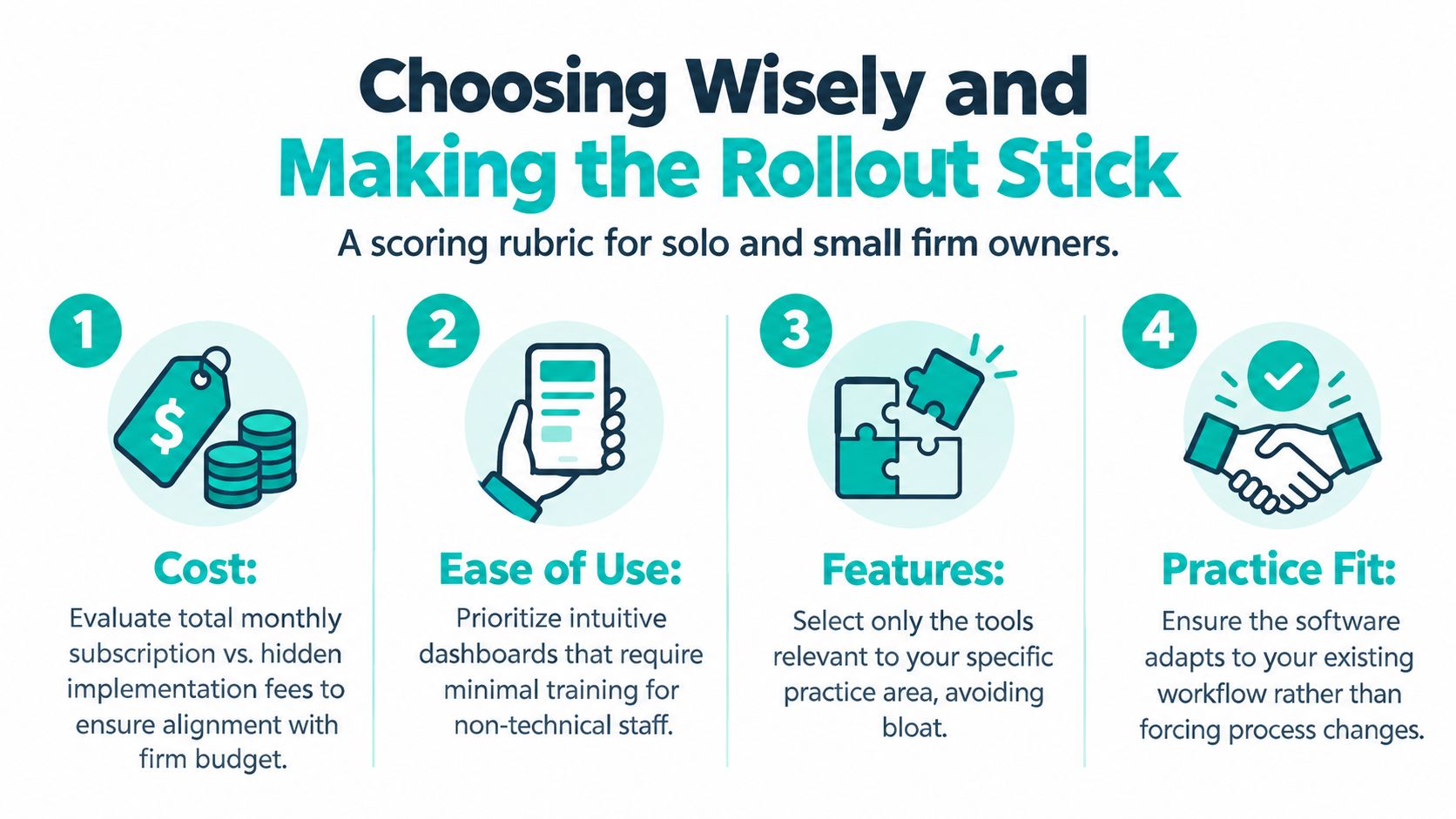
A sensible buying process starts with a simple scorecard. Rate every finalist on cost, ease of use, features, and practice fit, then force each score to reflect your actual bottleneck instead of generic preference. A platform that scores well in theory but weakly on your day-to-day work should lose.
Practical rule: if your team can't explain who owns each workflow step on day one, the rollout is too vague to survive week two.
Remote legal staff fit into this plan from the start, not after go-live. Assign one person to intake updates, one to matter status checks, and one to billing support, then define the security rules they need to follow. That's where a pre-vetted remote assistant or case manager can help your team absorb the new system without adding local headcount.
The easiest mistakes are the ones that look harmless early. Firms wait too long to train, try to turn on every feature at once, or assume adoption will happen because the software is “easy.” It won't. The firms that switch cleanly keep the rollout narrow, assign accountability, and measure whether the staff uses the tools they paid for.
Small firms don't need the flashiest platform. They need legal case management software small firms can use to reduce intake friction, protect deadlines, cut document churn, and keep billing and trust work under control. That means picking the system that fits the bottleneck, not the brand that looks strongest in a demo.
If you're ready to compare platforms or want help staffing the workflows around them, start with the process, then add the people. Virtual Legal Assistants helps U.S. law firms build remote support around intake, case updates, and billing tasks, so software adoption doesn't stall on the human side. Visit Virtual Legal Assistants to see how that support can fit your firm.