

 14 minutes read
Your inbox is already deciding part of your day before you get out of your first meeting. A solo attorney opens the laptop and sees client updates, intake requests, court notices, billing questions, and spam stacked in one long stream, with the most urgent items buried under the noise. That isn't just annoying, it chips away at billable time, slows responses to prospects, and makes client communication feel less controlled than it should.
For a law firm, a virtual email assistant is less about convenience and more about inbox control. Used well, it acts like a triage layer between your attorneys, your staff, and the flood of messages that arrive every morning. The right setup can protect confidentiality, route intake faster, and keep routine email work from swallowing work that should be going to clients, courts, and case strategy.
The market around this category has grown into a real business function, not a novelty. One estimate puts the global AI email assistant market at about USD 1.97 billion in 2025 and projects USD 12.03 billion by 2032, with a 29.5% CAGR from 2026 to 2032 (global AI email assistant market overview). Independent reports also describe a high-growth category moving from early commercialization into rapid scaling, which matters for firms that live inside their inboxes and can't afford sloppy delegation (AI email assistant market outlook).

The morning starts the same way for a lot of attorneys. You plan to clear a few messages, then a potential client follows up, a paralegal asks about a filing detail, a court notice lands in the middle of the inbox, and three low-value newsletters hide the thing you needed to see. By the time you've sorted the pile, half the morning is gone.
That's why inbox work in a law firm can't be treated as “small admin.” Every minute spent scanning, sorting, and deciding what to answer manually is a minute not spent on depositions, drafting, strategy, or direct client work. If the first response to a lead is late, intake gets harder. If a client's question sits too long, trust drops. If a deadline email is missed, the stakes are obvious.
A virtual email assistant gives the inbox a lane structure. Instead of every message landing in the attorney's hands at the same level, the assistant sorts what needs urgent action, what needs a draft response, what belongs in case management, and what can be filed away safely. That matters most in firms where one inbox serves several jobs at once, including intake, client communication, billing, and internal coordination.
The useful way to think about it is simple. You are not buying “more email.” You are building a control point so the firm can handle volume without adding clutter, confusion, or unnecessary headcount in the office. The rest of the article breaks that down in plain language, from the role itself to the service models, the workflow examples, the security checks, and the budgeting decisions that make the setup workable.
Think of a virtual email assistant as an inbox air-traffic controller. It doesn't just open mail and hope for the best, it routes messages according to rules, context, and urgency so the right person sees the right item at the right time. In a law firm, that usually means intake emails, client updates, internal requests, billing questions, and court-related notices all get different handling.
The simplest way to understand the role is to break it into four jobs:
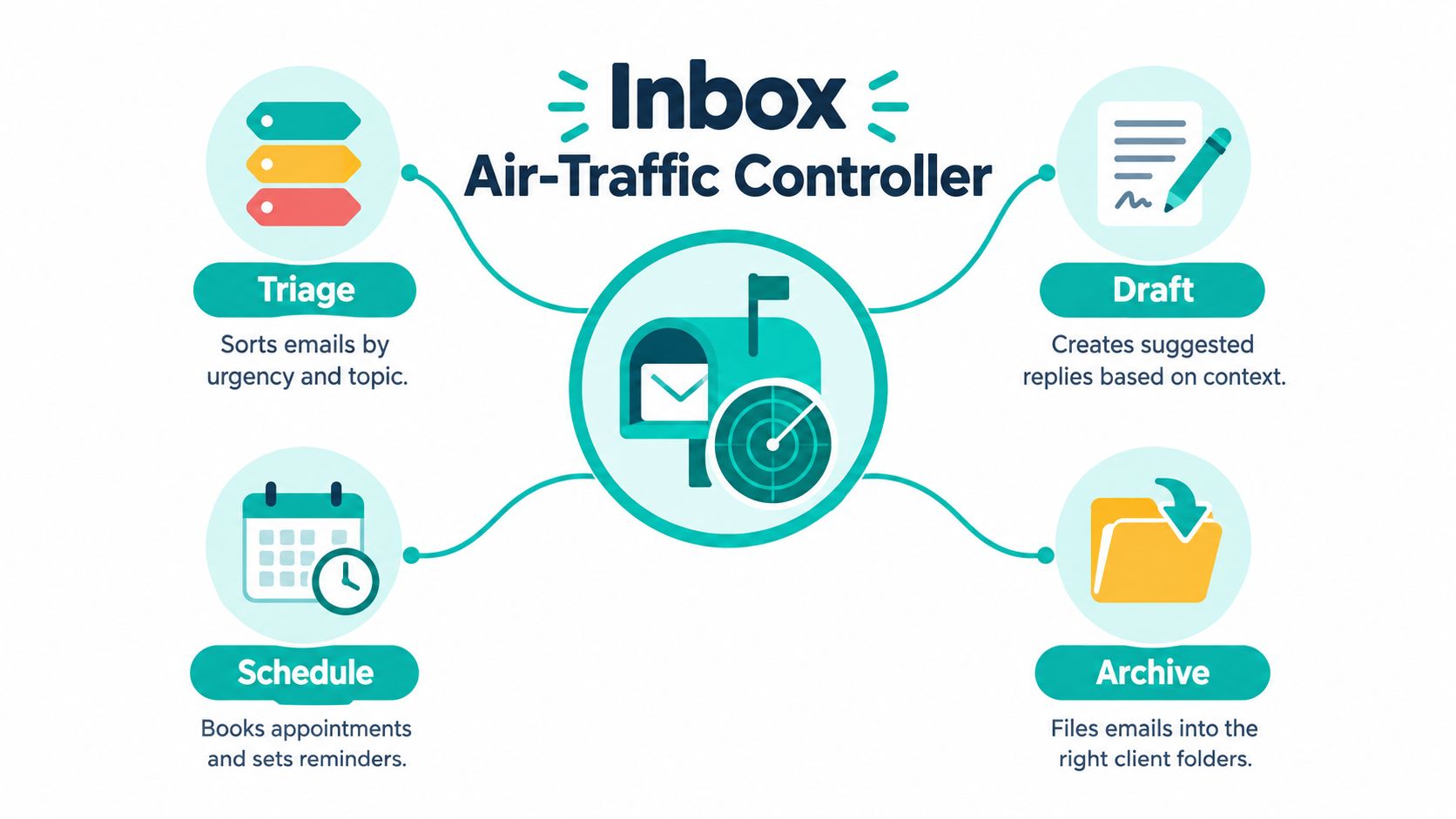
Those functions sound basic, but the value comes from consistency. A person can tell at a glance that a lead inquiry needs immediate attention, while a routine status update can wait. A good assistant applies that logic every time, even when the inbox gets messy.

Practical rule: if an email touches a deadline, a client commitment, or a new lead, it should not sit in the same pile as newsletters and receipts.
A human virtual assistant relies on judgment and firm-specific context. That works well when the inbox includes sensitive nuance, but it depends on training and availability. An AI-powered tool can sort, suggest, and draft quickly, but it needs supervision because it won't naturally know your firm's habits or risk tolerance. A hybrid model combines both, with software handling repetitive sorting and a human reviewing higher-stakes items.
For law firms, the distinction matters because “email help” is not one thing. A tool that drafts marketing replies is not the same as a system that handles a new injury intake, a status update from a Spanish-speaking client, and a scheduling request from opposing counsel. The assistant's value is in reducing decision load without creating new risk.
The internal services page from Virtual Legal Assistants is one example of how firms can map these inbox tasks to broader legal support roles. That kind of role-based framing is more useful than generic “admin help,” because it ties the inbox to real firm work like intake, scheduling, and case updates.
The right model depends on how much control your firm wants, how many moving parts the inbox contains, and how much supervision your team can realistically give. Some firms want one person handling everything with strong judgment. Others want software to do the first pass. Many need both, because a legal inbox rarely behaves like a simple customer support queue.
A dedicated human VA is strongest when the firm wants high context and direct accountability. That model is good for nuanced client communication, but coverage is usually tied to working hours and one person's bandwidth. An AI software subscription is attractive for speed and constant availability, yet it can miss context, especially when a message sounds routine but matters. A hybrid human-in-the-loop model sits in the middle, with software handling sorting and drafting while a person checks the work. An agency-staffed model adds sourcing, vetting, and replacement support, which reduces the hiring burden for the firm.
Decision point: if your inbox contains many urgent client messages or intake leads, you need more judgment. If it mostly contains repetitive routing and reminders, software can do more of the first pass.
| Model | Best fit | Strength | Trade-off |
|---|---|---|---|
| Dedicated Human VA | Firms that want direct handling and firm voice | Judgment and empathy | Less elastic coverage |
| AI Software Subscription | Firms with repeatable, high-volume sorting | Constant availability | Less nuance in edge cases |
| Hybrid Human-in-the-Loop | Firms balancing speed and review | Good balance of scale and control | Requires coordination |
| Agency-Staffed Model | Firms that want vetted remote support | Hiring and oversight are simplified | Needs clear workflow setup |
For law firms, confidentiality, software alignment, and time-zone overlap should weigh heavily. A bilingual assistant with U.S. schedule coverage is especially helpful in immigration, personal injury, family law, and civil litigation, where client messages often need careful handling across languages and working hours. Tools matter too. If the inbox assistant can work cleanly with systems like Clio, MyCase, Filevine, CASEpeer, SmartAdvocate, Smokeball, RingCentral, or DocketWise, then the firm spends less time re-keying information and more time moving matters forward.
A personal injury and immigration practice usually has two inbox problems at once. Leads come in fast, and active clients keep sending status questions. If nobody owns the first pass, attorneys end up reading everything themselves, which is exactly the wrong use of their time.
A virtual email assistant can start the day by separating new leads from everything else. An intake request gets tagged, the client's basic details are pulled forward, and the message moves into the lead workflow instead of sitting in a general inbox. Urgent deadline-related items get flagged for immediate review, while routine questions get queued for a draft response.
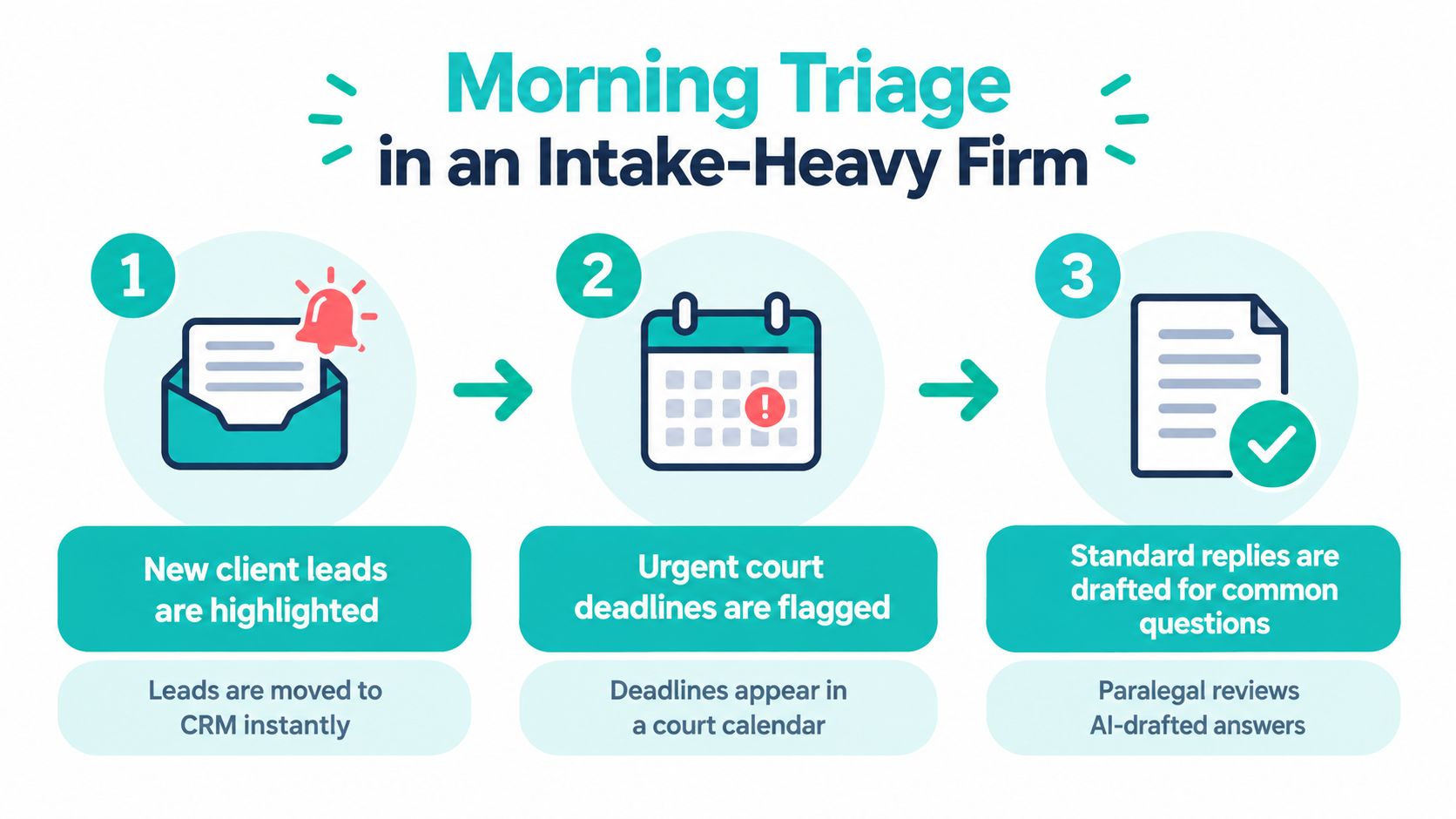
In practice, that means the assistant is not “answering everything.” It is making sure the right item reaches the right system. Leads can be pushed into a CRM or intake tracker, urgent court-related items can be mirrored in a calendar, and standard questions can be handed to a paralegal or attorney for review before they go out.
Once intake is stable, the same system can handle ongoing case communication. A client asking for a status update doesn't need to interrupt an attorney if the message can be labeled, summarized, and sent to the case manager. That case manager can then update the file in Clio, MyCase, or Filevine and respond with the right information once it's verified.
Inbox control starts protecting billable work. Attorneys stop re-reading the same kind of question ten times a week. Case managers stop hunting through threads for the latest version. The firm keeps a cleaner record of who said what, and when.
A good inbox workflow doesn't eliminate judgment. It preserves attorney judgment for the messages that actually need it.
By the end of the day, the assistant can clear completed threads into the right folders, attach payment-related messages to billing administration, and leave unresolved items flagged for the next morning. That sounds small, but it's what keeps a busy inbox from becoming a second case system. When email, scheduling, and case notes stay aligned, the firm spends less time recovering context.
The result is not magic. It's fewer interruptions, cleaner handoffs, and a better chance that nothing falls through a crack while the attorneys stay focused on higher-value work.
Client email in a law firm is not ordinary correspondence. It often contains sensitive facts, documents, deadlines, identity details, and strategic notes. That means the assistant should be treated like any other trusted access point, with controls attached from the start.
The safest setup is least-privilege access. Give the assistant only the inboxes, folders, and permissions needed for the assigned work, not full access to unrelated accounts. Separate intake, billing, and active matter communication if the firm can do that cleanly. Keep a clear record of who can see what, because confusion around access is how mistakes start.
Confidentiality agreements matter, but they're not enough on their own. The firm should also use secure passwords, multi-factor authentication, and a documented audit trail so it can see what actions were taken and when. If the assistant touches client communication, the trail needs to be more than informal trust.
A careful evaluation process matters before any automation or delegated access goes live. For triage, the safest approach is to label a representative inbox sample and measure how accurately the system identifies priority messages. For response automation, separate three checks, intent understanding, factual extraction, and action safety, so the assistant doesn't confuse a scheduling request with a billing issue or make up a promise in a draft. Shadow-mode testing is useful because it lets the firm compare suggestions against human judgment before anything sends.
Verification habit: review a small sample of real messages regularly, then adjust rules before the inbox becomes dependent on a weak pattern.
A practical provider checklist should include background checks, skills testing, software proficiency, and clear Contractor of Record coverage for administrative handling. The policy page for Virtual Legal Assistants' privacy practices is the kind of document firms should read before sharing live inbox access, especially if the assistant will touch intake or client-facing communication.
Email support can follow several pricing models. The suitable choice depends on message volume, workflow consistency, and how much oversight the firm needs. Predictable daily intake may fit a dedicated arrangement. Uneven demand may suit flexible hours or task-based work. Compare each model with the actual inbox workload, rather than treating the service as general administrative help.
| Pricing Model | Best For | Cost Predictability | Flexibility |
|---|---|---|---|
| Hourly | Variable inbox volume | Moderate | High |
| Part-time dedicated | Firms with regular daily needs | Higher | Medium |
| Full-time dedicated | Busy firms with constant inbox load | Highest | Lower |
| Monthly retainer | Firms wanting steady coverage | High | Medium |
| Task-based | Specific projects or limited workflows | Lower | High |
Transparent pricing matters because inbox delegation includes more than message handling. A quote may cover onboarding, workflow setup, replacement coverage, international payroll handling, and contractor administration. These details shape the cost of maintaining reliable triage and handoffs, even when an hourly rate appears straightforward.
The Virtual Legal Assistants' pricing structure shows the level of detail firms should request early. A provider that clearly identifies included services helps the firm compare equivalent arrangements and avoid unexpected coordination costs.
A law firm can evaluate the arrangement by comparing its cost with recovered attorney time, cleaner intake, and faster response handling. When attorneys no longer sort routine messages, that time can return to substantive legal work. A defined intake workflow can also route new inquiries, collect the required details, and move qualified matters into the case management process before they disappear in an unattended inbox.
The same logic applies to active matters. A delegated system can separate scheduling requests, document follow-ups, billing questions, and messages requiring attorney judgment. That triage protects billable attention without giving the assistant authority to make legal decisions or send unapproved advice.
If the inbox is stealing attorney attention from client work, the question isn't whether support costs money. It's whether the current setup is already costing more.
One option is a managed staffing model through Virtual Legal Assistants. It pairs part-time or full-time remote support with onboarding, payroll handling, and role matching. That structure can make budget planning easier for firms that want defined staffing support without building those administrative processes internally. The firm still needs to specify approval rules, confidentiality requirements, and which intake or case-management steps the assistant may handle.
Start by naming the one inbox problem that costs the most time. For some firms, that's intake. For others, it's client follow-up or calendar chaos. Don't try to automate every message on day one. Pick one workflow, define the handoff, and make that clean before expanding.
If a provider offers pre-vetted shortlists quickly and lets you interview before hiring, that reduces a lot of risk. It also helps the firm compare candidates on actual workflow fit, not just on a résumé. The best early win is simple, a cleaner inbox, faster intake handling, and fewer interruptions to attorney work.
Your next step is not a full inbox overhaul. It's one controlled workflow that proves delegation can work without sacrificing confidentiality or control. Once that lane is stable, expand it carefully into the next one.
Virtual Legal Assistants connects U.S. law firms with bilingual remote support professionals who can handle inbox triage, intake follow-up, scheduling, and case-related coordination. If your firm needs a structured way to protect billable time and keep client email moving, visit Virtual Legal Assistants and review how their staffing process fits your workflow.