

 13 minutes read
An assistant in a law firm is there to absorb non-billable work so attorneys can recover billable capacity, and the role usually shows up as administrative, legal, or intake support depending on what the firm needs to offload. In a busy practice, that means the assistant is not a side hire, it's a workflow decision.
The difference shows up fast. One senior associate can lose a whole day to inbox triage, reschedules, document chasing, and client follow-up, while the right assistant keeps matters moving and leaves the attorney with time for drafting, strategy, hearings, and client calls. In smaller firms, the titles overlap; in larger ones, the boundaries matter more. What matters most is not the label, it's which recurring tasks the assistant owns and which bottlenecks they remove.
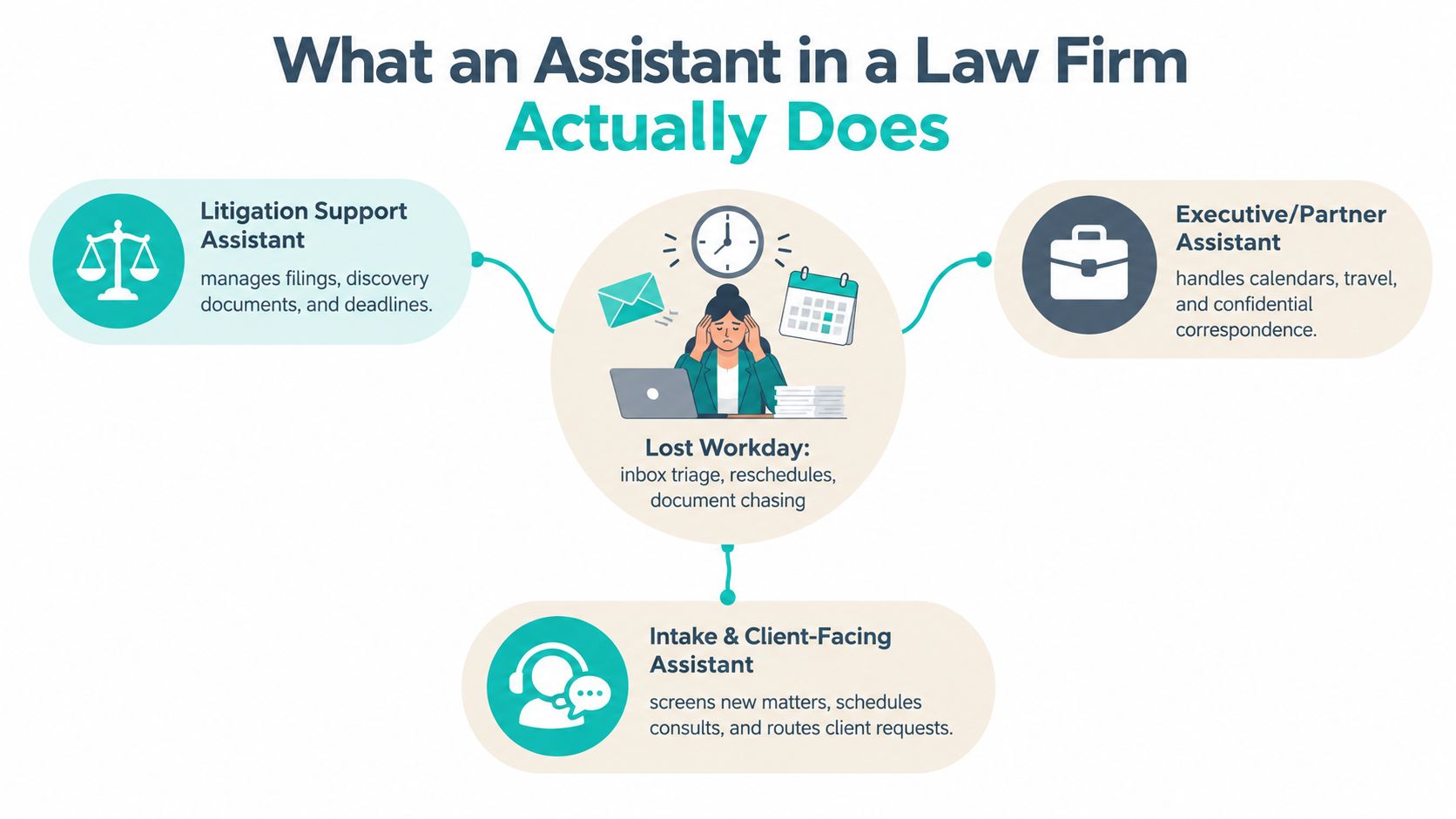
A lot of firms describe the role as “support,” then expect it to absorb everything nobody else has time for. That's why the job becomes vague, reactive, and underused. A better way to think about it is simple: the assistant's job is to reclaim attorney time by taking ownership of repeatable work that doesn't require a lawyer's judgment.
Administrative assistants handle scheduling, inbox management, travel, billing coordination, office operations, and day-to-day attorney support. They're often the first point of contact for calendars, meeting logistics, and internal coordination.
Legal assistants sit closer to the matter itself. They manage case files, deadlines, filing prep, document production, and often the paper trail that keeps a file ready for attorney review.
Intake assistants are front-end operators. They qualify new leads, book consultations, collect basic matter information, route calls, and keep the pipeline from leaking before a case is opened.
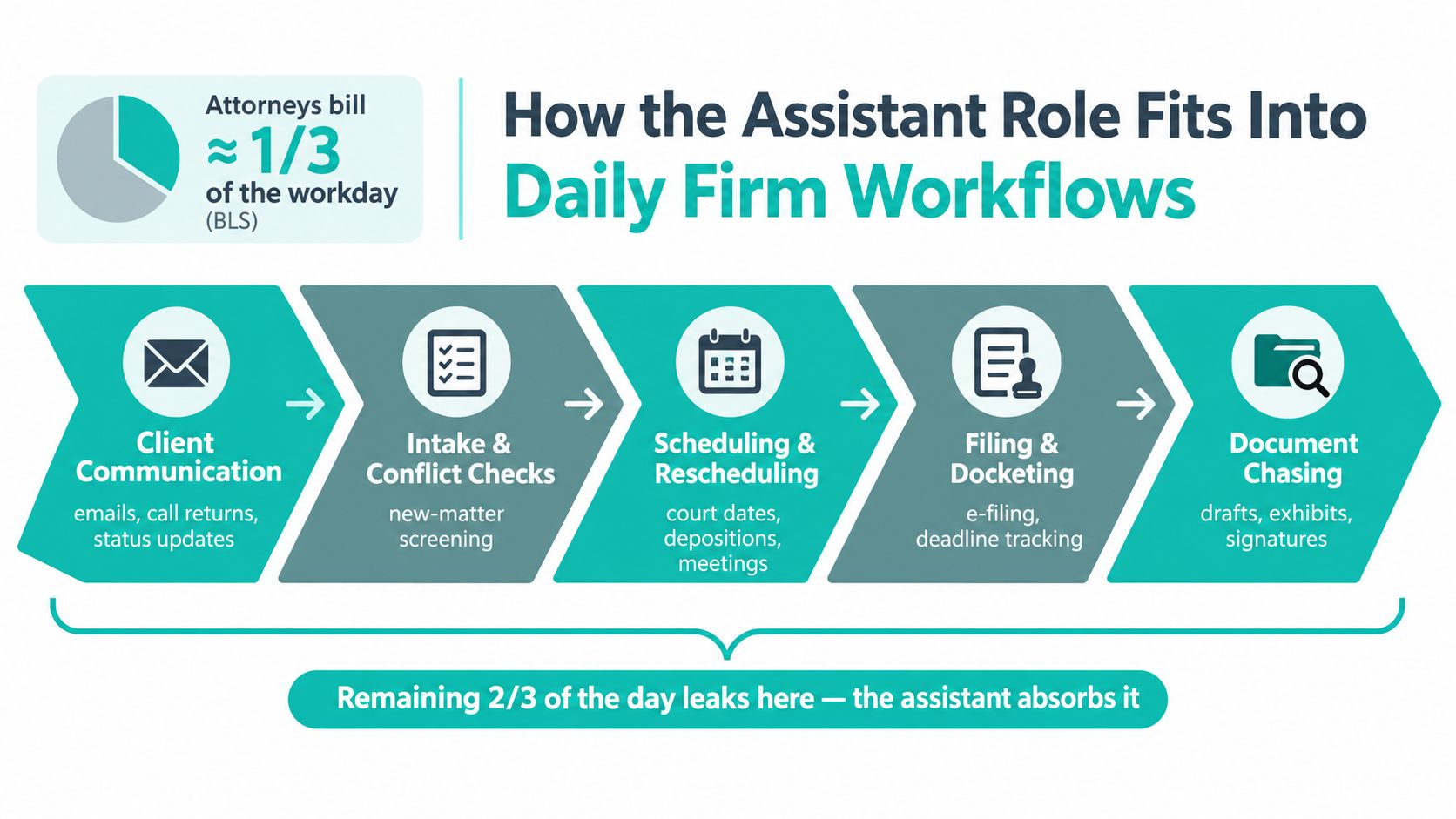

Practical rule: if a task repeats, follows a known process, and doesn't require legal judgment, an assistant should probably own it.
In smaller practices, those lines blur. A legal assistant might take initial calls, or an office admin might help with filing. That's fine, as long as the firm knows which workflows belong where. If you don't define ownership, the work just bounces around until an attorney does it.
The best assistant hires don't just “help out.” They create a predictable operating layer around the attorneys. That layer protects focus, reduces interruptions, and makes the firm easier to run. If the only thing the hire changes is that messages get answered faster, the firm is leaving value on the table.
The useful question is not, “What tasks can this person do?” It's, “Which attorney tasks will stop landing on the attorney's desk?” That distinction drives every staffing decision that follows.
Attorneys still spend too much of the day on work that looks small individually and becomes expensive when you add it up. The 2017 Clio Legal Trends Report found attorneys collected only 1.6 billable hours in an 8-hour day and that office administration, bill generation and sending, technology configuration, and collections consumed 48% of time that could otherwise be billable, which is why assistants matter as a utilization lever rather than a clerical luxury. Clio Legal Trends Report
The work usually leaks in the same places. Client communication gets fragmented, intake drags on, scheduling creates back-and-forth, filings pile up, and document chasing turns into a daily distraction. An assistant doesn't eliminate those tasks. They absorb them before they break the attorney's concentration.
That's especially useful in solo and small firms, where one missed follow-up or one delayed filing prep can ripple across the rest of the week. The attorney doesn't need to spend time retyping the same email, checking whether an exhibit set was assembled, or confirming whether the next consult was booked. Those are all assistant-owned workflows if the firm has set them up properly.
Some work needs to stay close to the attorney because it involves sensitive judgment, direct client nuance, or a high risk of error. Other work is portable once the firm puts controls in place. Calendar maintenance, document indexing, client follow-up, and intake screening are good examples of work that can be standardized without changing the legal substance of the matter.
The test is not whether a task feels “administrative.” The test is whether it needs an attorney's judgment at the moment it's done.
That distinction matters when you assign work across the matter lifecycle. First contact can be handled by intake. File setup can be handled by a legal assistant. Ongoing scheduling, deadline reminders, and document collection can be shared across roles. The attorney should enter the workflow only where legal review, strategy, or client counseling is needed.
When firms map the assistant role to the matter lifecycle, they stop hiring for vague support and start hiring for measurable relief.
The biggest mistake I see is hiring for a title instead of a bottleneck. A firm says it needs an assistant, then discovers it really needs intake coverage, or litigation support, or a person who can keep the partner's calendar from collapsing. The work choice matters more than the title.
| Role | Primary Ownership | Reports To | Core Tools | Key Workflows |
|---|---|---|---|---|
| Administrative Assistant | Calendar, inbox, billing coordination, office operations | Office manager or managing partner | Outlook, calendars, billing platform, phone system | Scheduling, travel, meeting prep, billing entry, front-office coordination |
| Legal Assistant | Case files, deadlines, filings, document production | Supervising attorney or paralegal lead | Docketing system, DMS, e-signature, court filing tools | Court filing prep, exhibit prep, deadline calendaring, document assembly |
| Intake Assistant | Lead response, screening, consultation booking, CRM upkeep | Operations or marketing | CRM, phone system, scheduling tool, intake forms | New matter response, conflict screening, retainer routing, lead follow-up |
The boundaries cross more often in smaller firms. A legal assistant may cover incoming calls. An admin may log basic new-matter data. That isn't a problem if the firm has defined the handoff point. It becomes a problem when everybody assumes somebody else is handling it.
Administrative assistants usually sit closest to the business side of the firm. Their work is about keeping the office synchronized, especially around calendars, recurring meetings, billing, and general coordination. They're useful when attorney time is being lost to logistics rather than case work.
Legal assistants are matter-oriented. They keep files moving, keep deadlines visible, and keep documents from falling through the cracks. If the firm has litigation volume, court deadlines, or heavy filing needs, this is often the most useful profile.
Intake assistants are conversion-focused. They protect response time, organize the first client conversation, and help prevent lead leakage. Plaintiff firms, immigration practices, and family law firms often feel this pressure most because the first response can shape the entire relationship.
For a fuller breakdown of admin-focused hiring, this administrative assistant hiring guide is relevant if your bottleneck is calendar and office coordination rather than matter support.
If the pain is missed calls and slow lead handling, hire intake. If the pain is filing, docketing, and document production, hire legal support. If the pain is the partner's calendar and billing chaos, hire administrative support. A title that sounds impressive won't help if it doesn't clear the actual friction point.
A good assistant week looks less like a list of chores and more like a chain of handoffs that keep the firm moving. In a solo practice, the assistant often becomes the difference between “we'll get to it” and “the file is already moving.” In a mid-size shop, the job shifts toward coordination, batching, and keeping multiple matters synchronized without constant attorney intervention.
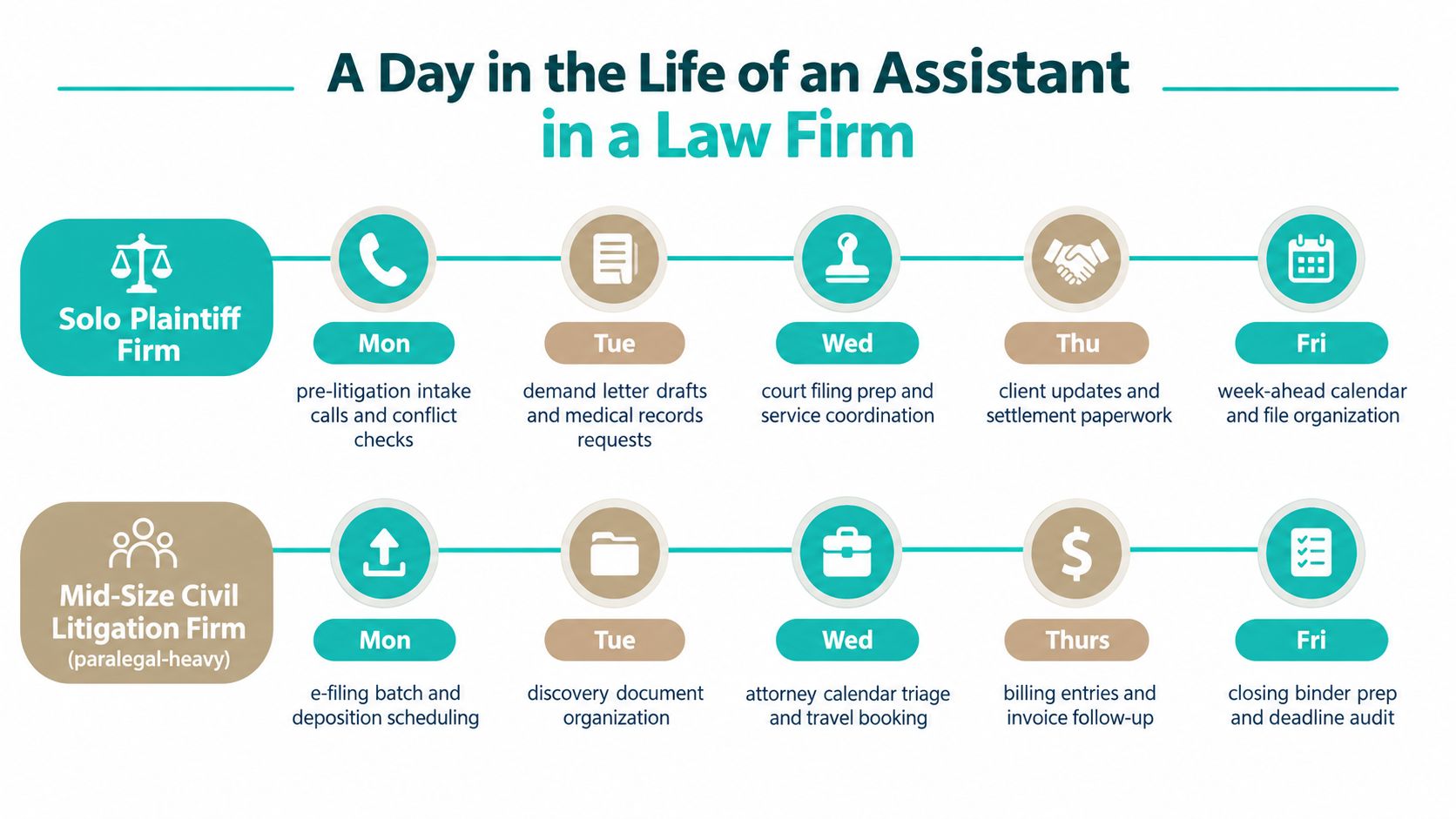
On Monday, the assistant opens the inbox, sorts new leads, and confirms which ones are ready for conflict checks. By Tuesday, they're requesting medical records and organizing the first demand package so the attorney doesn't have to start from a blank file. Wednesday usually turns into filing prep and service coordination, with Thursday focused on client updates and settlement paperwork, then Friday spent organizing the next week's calendar and cleaning up the file structure.
That sequence matters because each step creates the next one. If intake is sloppy, records requests get delayed. If calendaring is late, deadlines become attorney noise. If document preparation is inconsistent, the attorney ends up editing incomplete work instead of reviewing a clean draft.
The rhythm changes in a larger litigation office. Monday may start with e-filing batches and deposition scheduling. Tuesday often goes to discovery organization and production indexing. Wednesday becomes calendar triage and travel booking for attorneys moving between hearings or depositions. Thursday is usually billing entry and invoice follow-up, and Friday often turns into closing binder prep and a deadline audit.
That kind of week is less about speed on a single task and more about holding several files together at once. The assistant needs enough system fluency to move across the DMS, docketing system, and email without creating extra work for the legal team.
A strong assistant doesn't just complete tasks. They reduce the number of times an attorney has to stop and ask, “Did someone handle this?”
The useful question for a firm owner is whether your current workload looks more like the solo example or the litigation example. The answer should shape the job scope, the systems access, and the supervision model.
Remote staffing works when the workflow is digital, repeatable, and easy to supervise inside the firm's existing systems. It struggles when the work depends on physical paperwork, in-person presence, or constant hallway decisions that never make it into email. That's why the right answer is often workflow-specific, not ideological.
| Workflow | In-House Fit | Remote Fit | Key Constraint |
|---|---|---|---|
| Intake and lead response | Strong | Strong | Response discipline and handoff clarity |
| Calendar management | Strong | Strong | Shared access and careful escalation |
| Document indexing | Strong | Strong | DMS access and naming consistency |
| Billing cleanup | Strong | Strong | System permissions and review process |
| Physical court filing | Strong | Limited | Local presence and courthouse rules |
| In-person signing support | Strong | Limited | Document handling and client presence |
| Matter triage in partner office | Strong | Limited | Need for direct visibility and quick questions |
Remote staffing makes the most sense in high-volume intake, document organization, billing reconciliation, and back-office support. It also works well when the firm serves bilingual clients and needs reliable coverage across U.S. working hours. The challenge isn't the work itself, it's whether the firm has built secure access and clear workflows before hiring.
Remote staffing can look cheaper until the firm adds secure access, redundant systems, and the time spent handoff-checking work. If the process still depends on someone walking over to the attorney's office, the remote model will feel clumsy. If the firm hasn't documented how client issues escalate, the assistant ends up waiting for direction instead of acting.
That's why remote assistants work best when the firm has already standardized what “done” looks like. If the task is to update a CRM, log a call, send a follow-up, or prepare a file packet, remote support can fit cleanly. If the task requires paper originals, face-to-face interactions, or local filing rules, in-house still has the advantage.
For firms evaluating remote legal support, legal virtual assistants are one option when the work is already digital and the firm wants a role matched to specific workflows rather than a generalist hire.
Choose remote when the task is system-based, repeatable, and measurable. Keep it local when the task is physical, highly sensitive in the moment, or too dependent on quick in-office decisions. That rule prevents most bad staffing calls.
A strong hire starts with a narrow scope. If the firm can't explain what the assistant owns in one page, the role isn't ready yet. The fastest way to miss on the hire is to bring someone in without defining the workflow, the systems, and the handoff points.
A good reference check is specific. Don't ask whether the candidate was “good with software.” Ask how they handled the actual tools the firm uses and whether they kept docketing, filing, and follow-up reliable under pressure. If the work touches MyCase, Clio, or Smokeball, the reference should speak to that directly.
The first month should focus on supervised execution, not independence. By day one, the assistant should have the access they need and know who to escalate to. By the end of the first two weeks, they should have shadowed the main workflows enough to repeat them with review. By day 30, you should be able to tell whether the hire is freeing attorney time or just shifting work around.
For remote hires, the operational basics matter even more. Secure access, a dual-monitor setup, and a documented escalation path for client-facing issues are not extras. They're the minimum needed to keep the role safe and useful.
Hiring rule: if you can't define the handoff, the assistant will end up doing invisible work no one can measure.
For firms that want a managed hiring path, legal assistant hiring support can make sense once the role, workflow, and access model are clear. The staffing solution should follow the operational design, not replace it.
An assistant in a law firm is valuable when the role is tied to attorney utilization. The right hire removes recurring non-billable work, keeps matters moving, and gives attorneys more time for the work only they can do. Whether the answer is administrative, legal, or intake support depends on the bottleneck you're trying to clear.
If you're evaluating the role now, start with the workflow, not the title. Define the tasks, choose the access model, and decide whether in-house or remote support fits the way your firm works. If you're ready to compare vetted remote options against your current pain points, visit Virtual Legal Assistants and look at the roles that match your practice.